- +1 512-591-8295
- [email protected]
- Mon - Fri: 9:00 - 16:00
- +1 512-591-8295
- [email protected]
- Mon - Fri: 9:00 - 16:00
Use code MOM50 at checkout thru Mother’s Day to get 50% off any gift card for marketing services
Congratulations! Your podcast recording is scheduled.
Here’s some important information to know before we record.
Riverside FM – no log in required
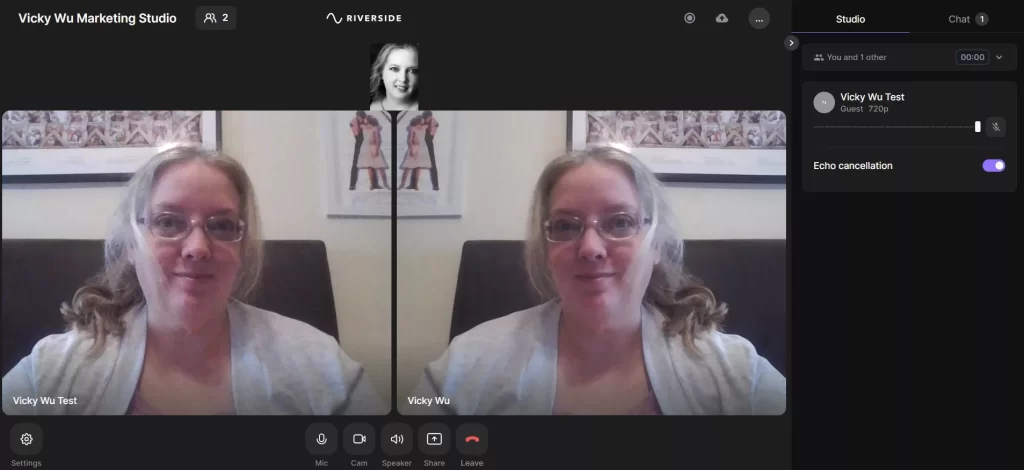
When you first click the link, you will need to enter your name as you want it to appear during the recording. Select whether you are using headphones or not, and then click Join Studio.
You will be on the LEFT (the guest in this image below is Vicky Wu Test), and your host (me!) will be on the RIGHT.
It defaults to your video being mirrored (flipped horizontal), so if you prefer to correct that, click the gear icon on the bottom left and toggle the switch to turn off mirroring.
Mic, camera, and screenshare can all be controlled from the icons across the bottom.
IMPORTANT NOTE:
Riverside FM is our recording platform since they provide high-quality audio and video. To achieve this high quality, they upload your audio and video to our account separately (unlike Zoom). You must keep the window open after our call ends to wait for the upload to finish. If you leave before upload completes, we will have you visit riverside.fm/upload to resume.
You may have already been a guest on a podcast, but in case you haven’t – or just want a refresher – below I provide a few best practices that I’ve learned over the years (from having a talk show on cable television, hosting podcasts and creating and editing videos for YEARS. )
Free mini training right here 😉
First, it is VERY important that if you plan to be on your phone, that you turn your phone horizontal before you click on our appointment link. Your desktop or laptop will provide a better experience, but we realize not everyone has this option.
Have good lighting in front of your face – on the other side of your video device – about 3′ in front of you. A selfie light can also do wonders for your videos. Or bring in a couple extra lamps if needed. Or face a window – but do not have the main source of lighting behind you.
Please let me know if you have any other questions that I can answer before our recording appointment. Shoot me an email, or use the chat bubble icon on the bottom right of our website.
This website uses cookies to ensure you get the best experience on our website. By continuing to use the website, you agree to our use of cookies. We do not share or sell your information. More info